Best overall: networked card-and-fob access control. Best for remote management: cloud-managed mobile access. Best for simple staff-only entry: a standalone keypad. The best keyless entry systems for small business in 2026 match your doors, staff turnover, and visitor routine—not just your preferred way to open a lock.
- The best keyless entry systems for small business assign individual credentials rather than a shared staff code.
- Networked card-and-fob access control is the default for businesses needing centralized staff permissions.
- Standalone keypads suit simple entry; cloud-managed mobile access suits managers who administer permissions remotely.
- GO Locksmith USA provides commercial access control and smart lock installation for Southwest Florida businesses.
Why this matters
An employee leaves. A delivery arrives before opening. Someone loses a fob. Your entry system needs a clear answer to each situation without turning every access change into a door visit.
Choose the way you manage access before choosing the reader or lock. A convenient credential does not fix a door that fails to latch, and an attractive app does not replace an exit plan.
For businesses in Fort Myers and Southwest Florida, GO Locksmith USA provides commercial access control and smart lock installation. Start with the doors and the people using them, then select the equipment that fits.
What makes the best keyless entry system?
Use these criteria to compare small-business entry systems in 2026:
- Individual credentials: Assign 1 credential per employee. You need to remove one person's access without disrupting everyone else.
- Door compatibility: Match the locking hardware to the door, frame, closer, and existing exit hardware. A reader alone does not secure an opening.
- Permission control: Separate staff, managers, and visitors where their access needs differ. Confirm that the selected system supports your required schedules.
- Failure behavior: Understand what happens during an internet outage, power loss, or depleted lock battery. Entry and exit need separate checks.
- Administrative workload: Decide who issues credentials, handles lost devices, and removes departing staff. Choose controls that person can actually maintain.
- Usable records: If you need entry records, specify them before buying. A successful credential event is not proof that only one person entered.
These criteria favor manageable access over novelty. A system with fewer features can still be the better fit when your business does not need remote administration or detailed records.
Small-business keyless entry systems at a glance
The table compares system types, not interchangeable products. Confirm each required feature in the specific equipment's documentation before choosing it.
| Rank and system | Best for | Standout capability | Key limitation |
|---|---|---|---|
| 1. Networked card-and-fob access control | Centralized staff permissions | Manages individual credentials across connected doors | Requires compatible door hardware and system administration |
| 2. Standalone keypad | Simple staff-only entry | Entry without cards, fobs, or phones | Shared codes weaken accountability; programming is local |
| 3. Cloud-managed mobile access | Remote administration | Connects mobile credentials with remote permission management | Depends on supported phones and a defined outage plan |
| 4. Standalone electronic fob lock | Entry without a network connection | Individual physical credentials at a local lock | Credential changes require local administration |
| 5. Intercom-linked entry control | Visitor screening | Lets a designated person approve visitor entry | Someone must handle requests; staff access needs separate planning |
1. Networked card-and-fob access control: best for staff permissions
Networked card-and-fob access control connects door readers to a system that manages credentials centrally. Employees present an assigned card or fob rather than sharing a door code. Select equipment that supports the access schedules, records, and door groups your business needs.
This is the strongest default for a business with different staff permissions. You can build the routine around issuing, changing, and removing an individual's access instead of repeatedly changing a shared credential.
Networked card-and-fob access control pros:
- Individual credentials support a clear employee access process.
- Central administration keeps permission changes in one place.
- Physical credentials do not require employees to use personal phones.
Networked card-and-fob access control cons:
- Readers, controllers, locks, and power arrangements must work together.
- Lost or loaned credentials still require a response from your administrator.
Best for: Businesses that need centralized control of staff access, especially where employees should not enter every connected door.
For a 2026 installation, write down your required permission groups before reviewing equipment. Start with 2 access groups—staff and managers—if those roles genuinely need different permissions; add other groups only when the workflow calls for them.
Verdict: Buy networked card-and-fob access control when centralized staff permissions are the main requirement.
2. Standalone keypad: best for simple staff-only entry
A standalone keypad opens a compatible lock after an accepted code is entered. Programming happens at the lock rather than through a central access-control dashboard. Models differ in their support for individual codes, schedules, and records, so list those requirements explicitly.
This setup suits a straightforward staff entrance where local administration is acceptable. Prefer individual codes over a shared code whenever the chosen lock supports them.
Standalone keypad pros:
- Staff do not need to carry a separate credential.
- Entry does not require a personal phone.
- A local setup avoids dependence on a central management connection.
Standalone keypad cons:
- A code can be copied or passed to another person.
- Local programming becomes a chore when staff permissions change frequently.
Best for: A business with a simple entry routine and a manager who can handle programming at the door.
Do not confuse convenience with accountability. If everyone uses the same code, you cannot distinguish users from that credential alone. Also check whether the keypad remains practical for employees carrying supplies or wearing gloves.
Verdict: Buy a standalone keypad for simple entry; skip a shared-code setup when individual accountability matters.
3. Cloud-managed mobile access: best for remote administration
Cloud-managed mobile access combines phone-based credentials with an online administration platform. The reader and phone must support the selected system's credential method. Specify remote permission changes, scheduling, and access records as requirements rather than assuming every platform includes them.
This category suits an owner or manager who needs to administer access away from the premises. The decision depends as much on employee phone use as on the management interface.
Cloud-managed mobile access pros:
- Remote administration separates permission management from a door visit.
- Employees can use supported phones instead of a separate fob.
- Individual mobile credentials support person-specific access changes.
Cloud-managed mobile access cons:
- Phone compatibility and employee willingness need checking before rollout.
- Phone battery loss and network outages require documented fallback arrangements.
Best for: Businesses whose managers handle access remotely and whose employees can use supported mobile credentials.
Before selecting a system in 2026, distinguish remote administration from door operation. An internet outage can affect those functions differently. Read the equipment's outage behavior, then test it during handover instead of accepting a general claim that the system works offline.
Verdict: Buy cloud-managed mobile access when remote administration solves a real operational problem.
4. Standalone electronic fob lock: best for non-networked entry
A standalone electronic fob lock checks an enrolled physical credential locally. It does not need a network connection to make that local access decision. Credential enrollment and removal follow the selected lock's programming process.
This is a practical option when you want individual physical credentials without installing a networked management system. It exchanges central convenience for local control.
Standalone electronic fob lock pros:
- Employees do not need personal phones for entry.
- Individual fobs avoid distributing a shared keypad code.
- Local access decisions do not depend on an internet connection.
Standalone electronic fob lock cons:
- Lost-fob removal requires the lock's local administration process.
- Managing separate locks becomes cumbersome when permissions change often.
Best for: A staff entrance where local credential management is acceptable and networked administration is unnecessary.
Check the removal process before selecting the lock. Losing a fob is ordinary; discovering that nobody knows how to disable it is preventable. Keep an assignment record and make sure the responsible manager can identify the credential to remove.
Verdict: Buy a standalone electronic fob lock for non-networked entry; skip it when centralized changes are essential.
5. Intercom-linked entry control: best for visitor screening
Intercom-linked entry control lets a visitor request access and a designated person release a compatible door lock. Audio and video functions depend on the selected equipment. This setup answers a different question from staff credentials: who approves someone who has not already been enrolled?
It fits businesses that need to screen customers, contractors, or deliveries before admitting them. Treat it as a visitor workflow, not an automatic replacement for employee access control.
Intercom-linked entry control pros:
- Visitors can request admission without receiving a permanent credential.
- A designated person decides whether to release the entrance.
- Visitor handling can remain separate from employee credential management.
Intercom-linked entry control cons:
- Unanswered requests leave visitors waiting outside.
- Remote release does not prevent someone following an admitted visitor through the door.
Best for: Businesses with a controlled visitor entrance and a reliable person or team to answer requests.
Decide who answers during breaks, opening, and closing. Also check the physical sequence: the door must release, open, close, and latch correctly. A successful intercom call cannot compensate for an entrance that stays unsecured afterward.
Verdict: Buy intercom-linked entry control for visitor screening; skip it as the only plan for staff permissions.
How these systems are ranked
Networked card-and-fob access control ranks first because it directly addresses individual credentials and centralized staff permissions. The remaining options serve distinct needs: simple code entry, remote administration, non-networked credentials, and visitor approval.
The ranking is a decision guide, not a claim that every product within one category outperforms every product in another. The right system is the one that meets your door requirements and remains manageable after installation.
Use the same criteria for every proposal. Ask for the credential process, hardware arrangement, outage behavior, and administrator responsibilities in plain language.
Before installation: check the whole entrance
A keyless entry project includes the opening, not just the device beside it. GO Locksmith USA provides commercial access control services; your installation discussion should cover the entrance and its daily use together.
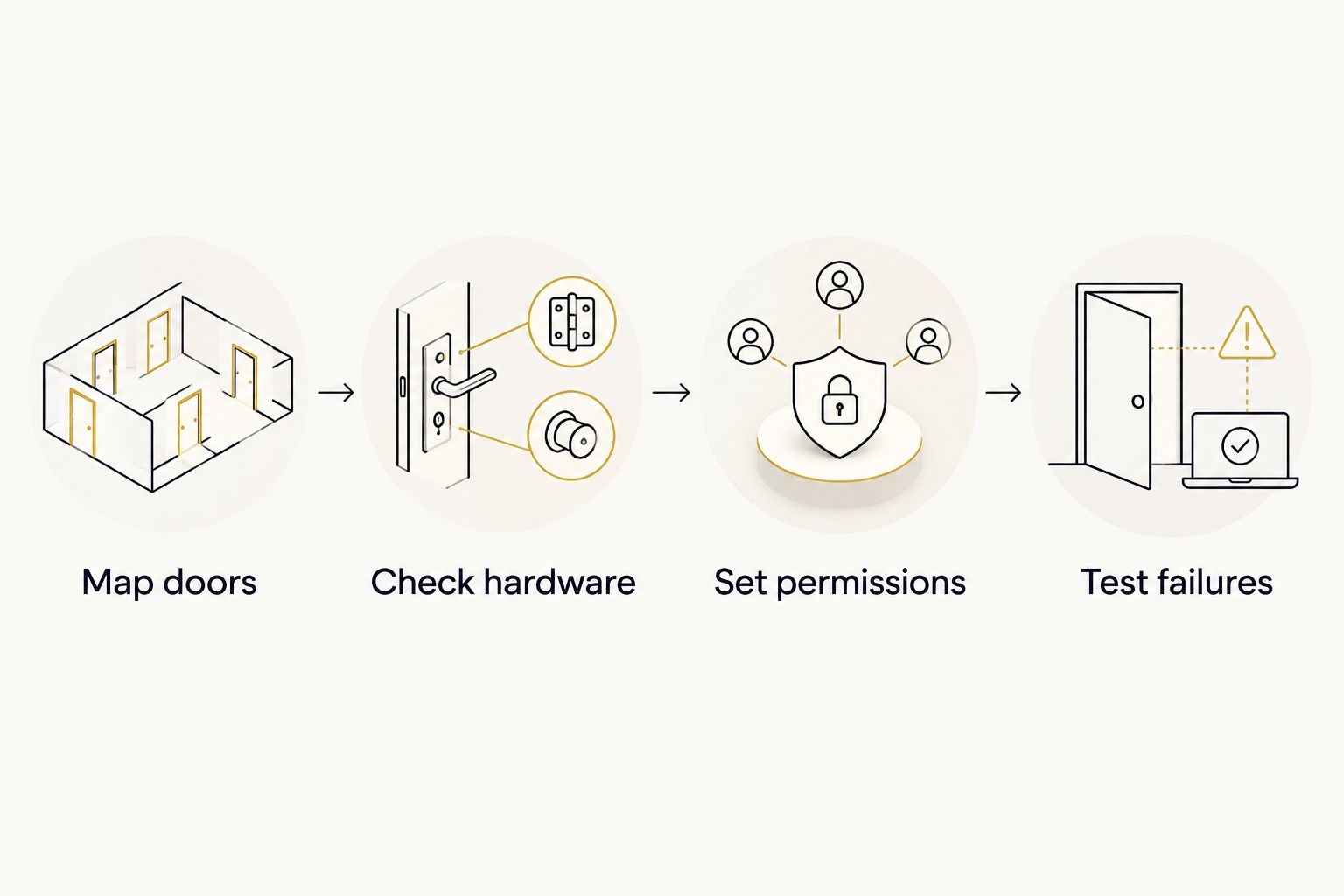
Work through this sequence before approving a 2026 installation:
- Map doors: Identify which entrances need employee access, visitor approval, or restricted access. Keep required exit routes separate from permission decisions.
- Check hardware: Inspect the door, frame, hinges, closer, latch, and existing exit hardware. Confirm that proposed changes suit the opening and applicable requirements.
- Set permissions: Assign responsibility for issuing credentials and removing access. Decide who can enter each controlled door and when.
- Test failures: Check 3 failure scenarios: internet loss, power loss, and a lost credential. Record the response for each before handover.
Do not accept a blanket answer that a door simply unlocks when power fails. Electrified locking arrangements differ, and required exit behavior depends on the opening and applicable rules. Have the installer explain how people enter and leave under normal operation and during each relevant failure.
Plan your business entry system
Discuss commercial access control and smart lock installation for your Southwest Florida business.
Which keyless entry system should you choose?
Choose networked card-and-fob access control as the default when you need centralized employee permissions. Choose a standalone keypad when entry is simple and local programming is acceptable. Choose cloud-managed mobile access when remote administration matters enough to justify a phone-based workflow.
A standalone electronic fob lock fits non-networked staff entry. Intercom-linked entry control fits visitor approval. Combine staff access and visitor screening only when each solves a separate, clearly defined need.
GO Locksmith USA is a local service option for Southwest Florida businesses that need commercial access control or smart lock installation. For your 2026 project, bring a door list and an access routine—not just a preferred lock—to the installation discussion.
FAQ
What's the best keyless entry system for a small business?
Networked card-and-fob access control is the default choice when a small business needs centralized employee permissions. A standalone keypad is a better fit when entry is simple and programming at the door is acceptable.
Is a keypad better than a key fob for employee entry?
A keypad is better when employees should not need a separate physical credential; a fob is better when you want an individually assigned object for entry. Use individual codes where supported, because a shared code does not identify which employee used it.
Can a keyless entry system work without internet?
Standalone keypads and standalone electronic fob locks make access decisions locally without an internet connection. For networked or cloud-managed systems, confirm exactly which door functions continue during an outage and test that behavior.
Can I manage business door access from my phone?
You can manage access from a phone when the selected platform supports mobile administration. Confirm that function separately from phone-based entry, because using a phone as a credential does not establish administrator capabilities.
What happens if an employee loses a fob?
Disable the lost credential through the selected system's administration process and issue a replacement. Keep a credential assignment record so the administrator can identify the correct credential without changing everyone else's access.
Do keyless locks stop someone following an employee inside?
No, an accepted credential does not prevent another person following through an open door. Staff procedures and appropriate entrance design must address that separate risk.
Who installs commercial keyless entry in Southwest Florida?
GO Locksmith USA provides commercial access control and smart lock installation in Fort Myers and Southwest Florida. Discuss the door hardware, employee permissions, visitor routine, and failure behavior before choosing equipment.
One last thing
Test employee departure before the first employee starts using the system. Enroll a test credential, confirm that it opens only the intended doors, remove it, and verify that entry is denied. That exercise checks the access process you will need when someone leaves—not just whether the new lock opens.